
How to List the Zenodo Depositions#
Note
Before going through this document, make sure you know how to create
an instance of the _Depositions class, depo_obj, by reviewing
the How to Work with Depositions guide.
Listing all existing depositions in your Zenodo account
is as simple as calling the _Depositions instance object’s
list_deposition() function
>>> depo_list = depo_obj.list_depositions()
>>> depo_list
[<zenopy.record.Record at 0x7fd400e4ebf0>]
Attention
By default, the list_depositions() function lists all depositions that
are in the published status. You can set this property by passing the
status = published as an argument to the list_depositions() function.
In order to list the all depositions that have not yet been published, pass the
status = draft to the list_depositions() function as an argument
>>> depo_list = depo_obj.list_depositions(status="draft")
>>> depo_list
[<zenopy.record.Record at 0x7fd400e4fac0>]
Simply check the state of the obtained record by calling its state
attribute
>>> depo_list[0].state
'unsubmitted'
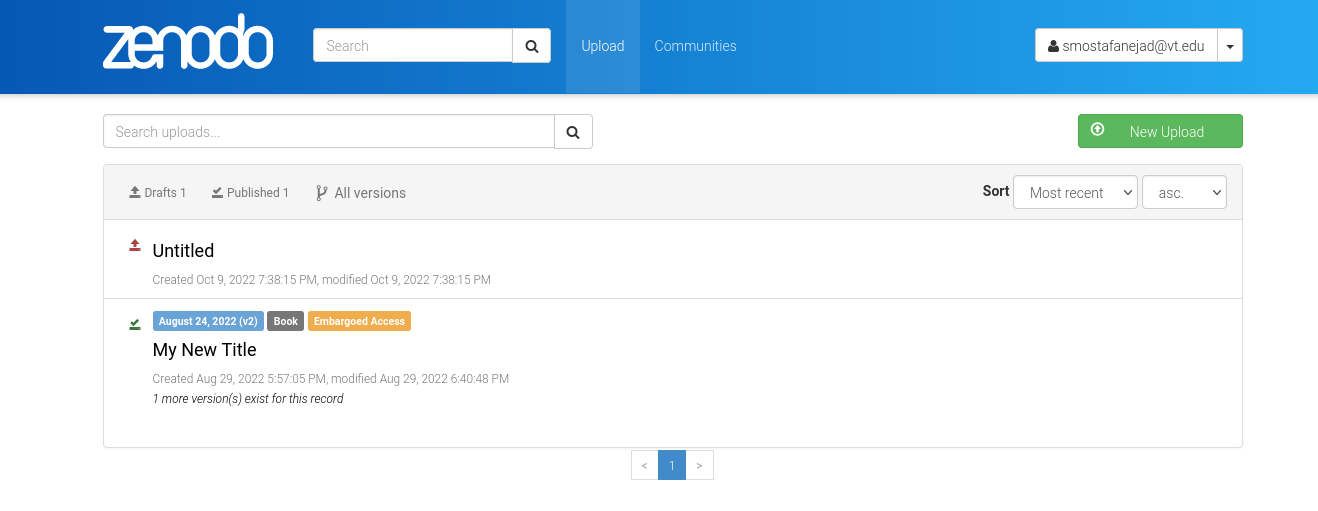
In your Zenodo account dashboard, you can correspond the published status
to a green check mark on the top-left corner side of your deposition title card.
Similarly, the draft status is associated with a red arrow pointing upwards
as you can see in the following snapshot
See also